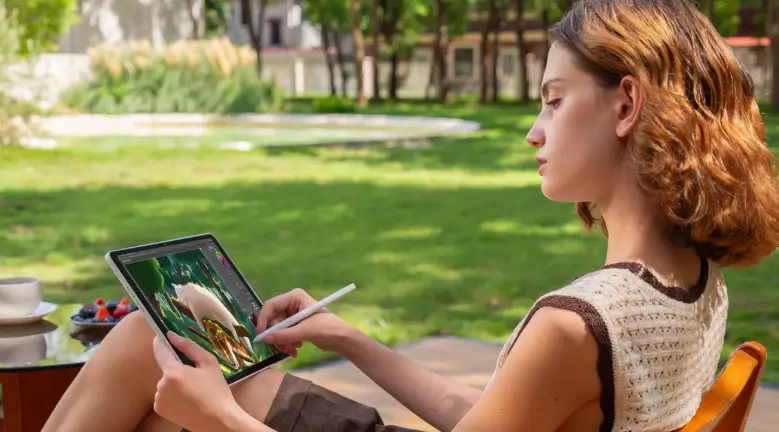
Planning a residential courtyard layout, mapping out perennial borders, and calculating hardscape square footage no longer keeps you chained to a heavy desktop workstation indoors. Today, both commercial landscape architects and dedicated home gardeners can walk straight into the yard, capture site measurements under open skies, and sketch scaled planting plans right on the spot. When searching for the best tablet for Garden Design, most buyers quickly hit a major crossroads: should you commit to Apple’s streamlined iPad ecosystem, or opt for the open file management and hardware diversity of Android?
Choosing between these two platforms directly shapes how clearly you see your screen in midday glare, which CAD or rendering tools you can run, and how natural your stylus feels when sketching organic foliage. Below, we break down the real-world differences across display engineering, software ecosystems, stylus tactile response, outdoor battery stamina, and overall value.
1. What Makes the Best Tablet for Garden Design?
Working out in an actual garden exposes hardware to far harsher conditions than a climate-controlled studio. Before comparing operating systems, any contender for the best tablet for Garden Design needs to clear four practical hardware benchmarks:
High Brightness and Anti-Glare Optics
Direct outdoor sunlight regularly reaches between 10,000 and 100,000 lux. A display needs at least 500 nits of sustained brightness—ideally paired with a nano-etched matte surface or anti-reflective coating—so white canvas backgrounds do not turn into blinding mirrors.
Precision Stylus Response
Drawing curved retaining walls, grading slopes, and layering canopy symbols requires a stylus with 4,096 to 16,384 pressure levels, reliable tilt recognition, and latency under 15 milliseconds so lines track your hand effortlessly.
Headroom for Heavy Layers and 3D Terrain
Modern landscape apps juggle high-resolution aerial site photos, dozens of vector plant layers, and sun-path shadow simulations. Having 8GB to 16GB of RAM prevents frustrating app crashes mid-consultation.
All-Day Battery and Weather Resilience
Dust from soil beds, morning dew, and sudden temperature shifts are part of site visits. Look for solid chassis sealing (IP53 or higher where available) alongside battery capacity capable of sustaining 8 to 10 hours of high-brightness field work.
2. iPad vs. Android: Which Offers Better Garden Design Software?
Software availability remains the sharpest dividing line between Apple and Android. Depending on whether your workflow leans toward architectural CAD drafting or freehand botanical illustration, each ecosystem brings distinct advantages to the table.
| Software Category | Top iPadOS Apps | Top Android Apps | Key Workflow Difference |
| Architectural CAD & 3D Modeling | Morpholio Trace, SketchUp for iPad, Shapr3D | AutoCAD Mobile, Concepts, Floor Plan Creator | iPad holds a clear lead in specialized landscape architecture tools |
| Planting Plans & Concept Sketching | Procreate, Concepts, Linea Sketch | Infinite Painter, Clip Studio Paint, Krita | Both platforms excel at custom brush engines and layered hand rendering |
| LiDAR & Site Measurement | Polycam, Magicplan, SiteScape | Magicplan, AR Plan 3D | iPad Pro’s dedicated LiDAR scanner builds far more accurate 3D site meshes |
The iPadOS Advantage in Architectural Workflows
Apple’s strongest moat sits in purpose-built architecture and landscape apps that simply have no direct Android equivalent. Morpholio Trace lets designers import a photo of a client’s backyard, set an accurate architectural scale, calculate paving area automatically, and drop in realistic plant stamps. Similarly, SketchUp for iPad allows push-pull 3D terrain modeling right on the touchscreen. On top of that, iPad Pro models include a built-in LiDAR scanner that captures existing property elevations and patio boundaries in minutes, drastically cutting down manual tape-measure errors.
Android’s Open File System and Multitasking Freedom
While Android lacks Morpholio Trace, it runs AutoCAD mobile and Concepts—an infinite-canvas vector sketching app loved by landscape planners—with smooth responsiveness. Where Android genuinely shines is file autonomy. You can plug in an external USB-C thumb drive, drag and drop DWG, DXF, or PDF blueprints directly into local folders without cloud workarounds, and run split-screen mode with a regional native-plant database open right beside your drawing canvas. For many professionals evaluating the best tablet for Garden Design, avoiding proprietary file bottlenecks saves hours every week.
3. Drawing Experience: iPad vs. Android Tablets
Hand-drawn concept boards remain the quickest way to help homeowners visualize how a pergola, stone pathway, and perennial border will feel together. When comparing the best tablet for Garden Design from a tactile standpoint, glass friction and stylus ergonomics matter just as much as raw processor speed.
Apple Pencil Precision on Smooth Glass
Pairing an iPad with the Apple Pencil Pro delivers rock-solid line stability, crisp tilt shading, and convenient barrel-roll and squeeze shortcuts for switching between shrub brushes and scale rulers. However, standard iPad screens use glossy, low-friction glass. Many garden designers find the plastic nib slippery outdoors and spend an extra $30 to $45 on removable matte screen protectors—which slightly dull display sharpness. Apple offers nano-texture matte glass natively, but restricts it to high-storage iPad Pro tiers.
Natural Paper Feel on Android and Dedicated Drawing Pads
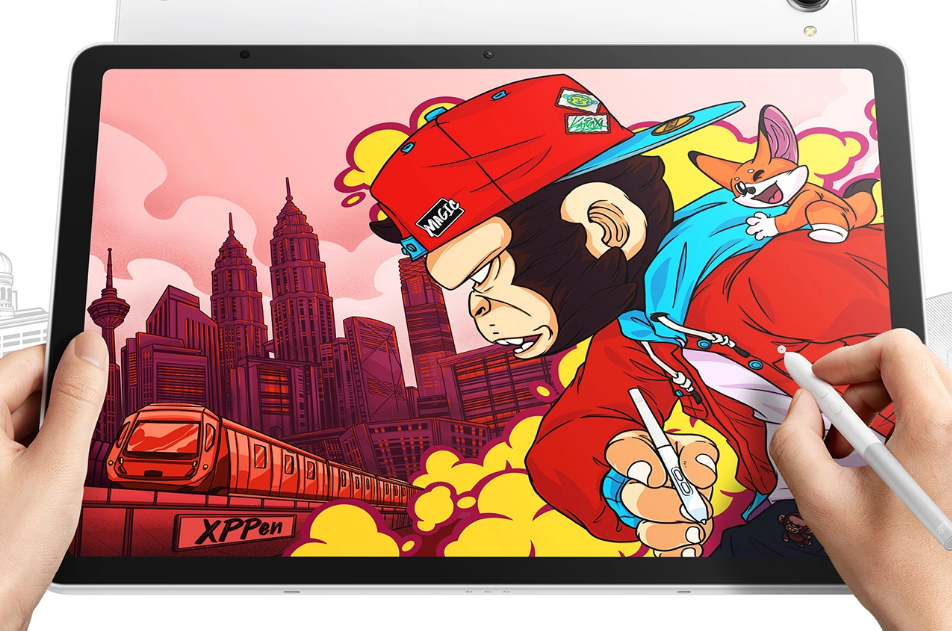
Android tablets and standalone pen computers take a more artist-first approach to surface texture and pen ergonomics. Flagship Android slates typically bundle battery-free styluses equipped with softer elastomer nibs that grip the screen naturally. If your garden planning revolves heavily around hand-sketched master plans, watercolor-style planting elevations, and on-site visual markups, purpose-built hardware makes a noticeable difference. For instance, the XPPen Magic Pro 13 standalone drawing Pad runs Android 16 completely independent of a computer, combining a 12.95-inch 3K anti-glare nano-etched matte display (650 nits typical brightness) with the 16,384-pressure-level X4 Smart Chip stylus. In bright garden light, its etched matte surface cuts reflections while delivering the subtle tooth of real sketching paper, making it a practical fit for designers and garden enthusiasts who spend hours drawing planting beds on location.
4. Performance and Battery Life for Outdoor Garden Design
Cranking screen brightness past 80%, running GPS location pins, snapping site reference photos, and manipulating multi-layer vector files puts intense thermal and power demands on any mobile device. Evaluating the best tablet for Garden Design means looking closely at how these machines hold up after three hours in the sun.
Chipset Speed vs. Thermal Dimming
Apple’s M4 iPad Air and M-series iPad Pro chew through complex 3D shadow studies and multi-layer Procreate files without stuttering. However, thin aluminum unibodies absorb heat quickly; under 90°F (32°C) summer sunlight, iPads frequently trigger thermal protection within 15 to 20 minutes, automatically throttling peak screen brightness by roughly 20% until the chassis cools down.
Battery Capacity and Rapid Top-Ups
Large-screen Android tablets in the 12-to-14-inch class commonly house 10,000mAh to 11,200mAh batteries paired with efficient Dimensity 8300, Dimensity 9300+, or Snapdragon 8-series processors. During continuous high-brightness outdoor site work, they routinely deliver 7.5 to 9 hours of active screen time. Even better, most Android devices support 45W PD fast charging—plugging into a portable power bank during a 30-minute lunch break restores over 50% battery, whereas iPads generally cap out around 20W to 30W.
Field Connectivity Tips
Whichever platform you choose, prioritize models with 5G cellular connectivity or built-in dual-band GPS if you work on rural estates, public parks, or new construction lots lacking Wi-Fi access.
5. Price Comparison: Which Tablet Offers Better Value?
Looking strictly at base retail sticker prices can be misleading. To calculate the true cost of setting up the best tablet for Garden Design, you need to factor in the stylus, protective field case, storage upgrades, and recurring software subscriptions.
| Cost & Value Factor | Apple iPad Air / Pro Setup | Mid-to-High Android / Standalone Drawing Tablet Setup |
| Starting Hardware Price (256GB) | $699 (iPad Air 13″) – $1,299 (iPad Pro 13″) | $550 – $999 (includes 12″–14″ large-screen models) |
| Stylus Expense | Sold separately ($129 for Apple Pencil Pro) | Included in the box on nearly all major models |
| Factory Anti-Glare Matte Screen | Restricted to 1TB+ iPad Pro models ($1,999+) | Included natively on several mid-range and pro models |
| Storage Expansion | Fixed internal storage (no card slot) | MicroSD expansion up to 1TB–2TB on many models |
| Overall Value Profile | Best ROI for commercial firms reliant on CAD/LiDAR | Higher upfront hardware value for sketch-heavy workflows |
When you tally the complete kit, an iPad setup typically costs 25% to 40% more out of pocket once you add the Apple Pencil and sufficient storage for heavy site photos. For commercial firms billing hourly CAD and BIM work, that premium pays for itself quickly. Conversely, independent garden designers, horticulture educators, and homeowners remodeling their own yards get substantially more screen real estate, expandable microSD storage, and included accessories per dollar on the Android side.
6. iPad or Android: How to Choose?
Still torn between the two ecosystems? Match your daily habits against these two distinct user profiles to pinpoint the best tablet for Garden Design for your specific projects:
Choose an iPad if:
- You work as a full-time landscape architect or CAD drafter who relies daily on Morpholio Trace, SketchUp for iPad, or Vectorworks exports.
- You want built-in LiDAR scanning to capture rapid 3D topography and house elevations during initial client site visits.
- Your studio already runs on MacBooks and iPhones, making instant AirDrop transfers of site photos and marked-up PDFs essential to your daily speed.
Choose an Android Tablet or Standalone Drawing Pad if:
- Your primary focus is freehand concept sketching, colorful planting layouts, and hand-annotated site plans where natural paper-like screen texture matters most.
- You prefer straightforward drag-and-drop file transfers via USB-C drives or microSD cards without paying extra for cloud storage tiers or mandatory accessories.
- You spend long days outdoors and want a 10,000mAh-class battery paired with Conclusion45W fast charging so a dead screen never interrupts an afternoon
consultation
Ultimately, finding the best tablet for Garden Design comes down to balancing specialized architectural software against tactile sketching comfort and budget efficiency. If your projects demand LiDAR site scans and seamless BIM integration, Apple’s iPad Pro remains the industry standard. Yet if you prefer sketching lush planting concepts freehand, working outdoors without harsh screen glare, and skipping steep accessory markups, Android-based options—especially purpose-built standalone drawing tablets like XPPen, with their native nano-etched anti-glare displays and high-precision styluses—deliver an intuitive, budget-smart workstation ready for any garden project.