Portable gaming places the Nintendo Switch screen at the center of almost every handheld session. A fall, pressure inside a bag, repeated handling, or an internal display fault can quickly interfere with visibility and touch response. Some problems appear immediately, while others begin as flickering, unusual colors, or intermittent display behavior.
Recognizing those symptoms early helps prevent gamers from confusing a screen fault with an unrelated console problem. Professional Nintendo Switch Repair involves diagnosing the affected component before deciding what work is appropriate. Proper assessment is especially important because cracked glass, display failure, touch problems, and power faults can create very different symptoms.
Recognizing When a Switch Display Needs Attention
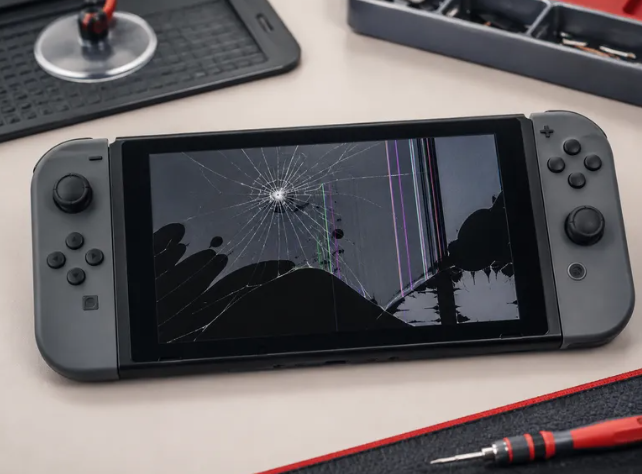
Visible cracks are among the easiest signs of physical screen damage, but display problems are not always obvious. Dark patches, unusual colors, flickering areas, lines across the image, or a screen that remains black can indicate that the console requires inspection. Nintendo also identifies cracks, blotches, discoloration, and abnormal screen colors as issues that may require servicing.
Touch behavior provides another useful clue. If taps or swipes stop registering correctly even after the display has been cleaned and a screen protector has been removed, a hardware assessment may be necessary. Nintendo recommends testing touch input through the console settings before concluding that servicing is required.
Typical warning signs include:
- Cracks or substantial surface damage
- Sections displaying distorted or unusual colors
- Touch input that fails to register properly
- Flickering or inconsistent display output
- A screen that remains dark while the console operates
Why Accurate Diagnosis Comes Before Component Replacement
A black display does not automatically prove that the screen itself has failed. Power, charging, internal hardware, or other console faults may create symptoms that initially appear display-related. Starting with diagnosis helps technicians determine the affected area rather than replacing a component based only on what can be seen externally.
Physical damage can also involve more than one part of the console. An impact strong enough to damage the display could affect surrounding hardware, controls, or internal connections. A technician can inspect the device, identify the actual fault, and determine the appropriate repair route before replacement work begins.
Before servicing, useful observations include:
- Whether the console still powers on normally
- Whether audio remains available
- When the display problem first appeared
- Whether touch controls continue responding
- Whether the device recently experienced an impact
Understanding Different Types of Switch Screen Faults
Not every display problem has the same cause or requires the same response. The Nintendo Switch uses a touch-enabled screen, meaning image output and touch interaction both matter during handheld use. Diagnosis should therefore consider what the player sees as well as how the panel responds to input.
Careful testing can separate cosmetic concerns from faults that interfere with actual gameplay. A scratch may remain largely visual, while severe cracks, unresponsive touch areas, discoloration, or display failure can substantially affect normal use. Identifying that distinction supports a more appropriate repair decision.
Cracked Screen Damage
Drops and direct impacts can leave visible fractures across the front of the console. Even when an image remains visible, extensive cracking can make handheld use uncomfortable and interfere with viewing. Physical breakage should be assessed rather than repeatedly pressing or handling the affected surface.
Unresponsive Touch Input
A display may show games correctly while failing to recognize taps or swipes in certain areas. Before servicing, Nintendo recommends removing a screen protector, cleaning the screen with a soft dry cloth, and using the built-in touch test. Persistent response problems can then be evaluated professionally.
Display Lines and Discoloration
Colored lines, blotches, abnormal shades, or discolored sections can indicate a problem beneath the visible surface. These symptoms may remain present even when the console otherwise functions. Because internal display faults cannot be identified reliably from appearance alone, inspection helps establish the appropriate solution.
Black Screen Problems
A screen that stays black needs diagnosis because the source may not necessarily be physical screen damage. Technicians can examine the device and distinguish display-related symptoms from power or other hardware issues. That prevents assumptions from determining which component receives attention.
Flickering Display Output
Intermittent images can make games difficult to follow even when the screen has no obvious cracks. Flickering may appear continuously or only under particular conditions, so technicians benefit from knowing when it occurs. Reproducing the symptom can assist the diagnostic process.
Damaged Touchscreen Behavior
Erratic touch input differs from a screen that simply does not respond. Unexpected selections or inconsistent input can disrupt menus and touchscreen functions. Testing the console carefully allows the repair process to focus on the observed fault instead of relying solely on exterior appearance.
What Happens During Professional Console Screen Service
Once the problem has been identified, technicians can determine whether screen work or another repair is necessary. Display servicing requires careful handling because the screen forms part of a compact portable console containing closely positioned electronic components. Accurate installation is only one part of the process, since the repaired unit should also be checked afterward.
A professional service process may involve:
- Inspecting the console and reported symptoms
- Diagnosing the source of the display fault
- Carrying out the required repair
- Checking screen clarity after the work
- Testing touch response and console operation
See also: How to Start and Scale a Successful Small Business in 2026
Final Thoughts
Could one damaged screen be the only thing standing between a console and comfortable handheld gaming? A proper diagnosis can reveal whether the problem comes from physical damage, touch response, display hardware, or another console component, allowing the required service to address the actual fault instead of relying on guesswork.
For gamers seeking Nintendo Switch Screen Replacement in Dubai, 800fixing provides dedicated Nintendo console services that include display solutions alongside diagnosis for other console problems. With pickup and delivery, repair warranty availability, and post-repair testing listed as part of its service offering, the company gives Dubai customers a practical route for getting a damaged gaming device professionally assessed and serviced.